本地仓库创建
1
2
3
4
5
|
# 创建仓库
git init

# 创建裸仓库(用于远程服务器,其中没有当前版本的文件)
git init --bare
|
服务器端需要使用裸仓库。裸仓库在服务器上不能操作。普通仓库可在服务器端操作,但会产生冲突。
如果使用普通仓库,客户端进行推送的时候会报错,需要在服务器端执行以下命令:
1
|
git config receive.denyCurrentBranch warn
|
1
2
3
4
5
|
# clone远程仓库(最后的文件可以是".git"也可以是"/.git"
git clone ssh://用户@ip:端口/目录

# 示例
git clone ssh://root@182.61.27.134:23333/home/git/Django.git
|
服务器端需要使用裸仓库。裸仓库在服务器上不能操作。普通仓库可在服务器端操作,容易产生冲突。
1
2
3
4
5
|
# 普通仓库
git init

# 裸仓库
git init --bare
|
如果使用普通仓库,客户端进行推送的时候会报错,需要在服务器端执行以下命令
1
|
git config receive.denyCurrentBranch warn
|
远程仓库使用
克隆远程仓库
不存在本地仓库,需要从远程仓库获取内容
1
2
3
4
5
|
# clone远程仓库(最后的文件可以是".git"也可以是"/.git"
git clone ssh://用户@ip:端口/目录

# 示例
git clone ssh://root@182.61.27.134:23333/home/git/Django.git
|
推送到远程仓库
存在本地仓库,远程仓库为空,需要将本地内容覆盖到远程仓库
1
2
3
4
5
6
7
8
|
# 添加远程仓库
git remote add origin ssh://root@182.61.27.134:23333/home/git/Django.git

# 提交本地修改
git add .
git commit -m "init message"
# 推送到远程仓库
git push -u origin master
|
基本命令
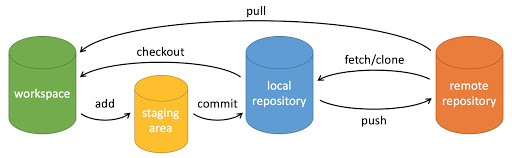
| 命令 |
作用 |
备注 |
| git init |
创建仓库 |
|
| git add . |
将当前目录下所有内容加入仓库 |
|
| git commit -m "" |
提交更改 |
|
| git pull |
拉取数据 |
git pull origin 当前分支 |
| git push |
推送数据 |
git push origin 当前分支 |
| git fetch |
拉取并合并 |
针对所有远程仓库的所有分支 |
| git clone xxx.git |
从远程克隆仓库 |
|
| git remote … |
远程仓库 |
|
| git branch |
分支 |
|
| git submodule |
子模块 |
|
| git stash |
暂存 |
|
| git merge test |
合并 |
将test分支的内容合并到当前分支 |
| git log |
查看历史提交记录 |
|
| git blame file_name |
查看文件的修改记录 |
|
| git status |
查看仓库当前状态 |
|
| git diff |
获取文件在暂存区和工作区的差异 |
|
| git reset |
回退版本 |
|
| git rm |
删除暂存区和工作区的文件 |
|
| git mv |
移动、重命名文件 |
|
| 命令 |
作用 |
备注 |
| git branch |
查看本地所有分支 |
|
| git branch -r |
查看远程分支 |
|
| git branch -a |
列出所有本地和远程分支 |
|
| git branch name |
创建分支 |
|
| git checkout branch_name |
切换到分支 |
|
| git checkout -b branch_name origin/branch_name |
从远程拉取该分支,并切换到该分支 |
|
| git branch -d branch_name |
删除分支 |
|
| git branch -D branch_name |
强制删除分支 |
|
| git branch -m old_name new_name |
重命名分支 |
|
| git branch -M old_name new_name |
强制重命名分支 |
|
| git branch -v |
查看各个分支最后一次提交 |
|
| git branch -merged |
查看哪些分支合并入当前分支 |
|
| git branch -no-merged |
查看哪些分支未合并入当前分支 |
|
| git merged origin/branch_name |
从远程分支合并到本地 |
|
| git branch -d -r branch_name |
删除远程分支 |
还需要把删除推送到远程:git push origin : branch_name |
| 命令 |
作用 |
备注 |
| git stash save example |
暂存,暂存名称为“example” |
|
| git stash list |
获取暂存列表 |
|
| git stash pop 0 |
恢复暂存(0为暂存列表索引) |
|
| git rm filename |
将文件从暂存区和工作区删除 |
|
| git rm –cached filename |
将文件从暂存区删除,但是在工作区保留 |
对于已经推送过,但是新加入gitignore的文件,需要使用此操作 |
| 命令 |
作用 |
备注 |
| git remote add origin xxx.git |
添加远程仓库,标识为origin |
|
| git push -u origin master |
将master分支推送到origin远程仓库 |
|
| git remote rm name |
删除远程仓库 |
|
| git remote rename old_name new_name |
修改仓库名 |
|
裸仓库
裸仓库本身是不包含当前工作目录,没有上传的源码内容。不过,包含hooks,可以通过hook进行自动部署。
hook的使用
 1
 2
 3
 4
 5
 6
 7
 8
 9
10
11
12
13
14
15
|
cd git/hooks
touch post-receive && vim post-receive

# post-receive文件中添加以下内容
#!/bin/sh
DEPLOY_PATH=/home/wwwroot/default/myproject/  #这个路径是服务器上项目的目录位置
**#**在这个目录中要记得先克隆一下git的项目,这一条很重要****
unset  GIT_DIR #这条命令很重要
cd $DEPLOY_PATH
git reset --hard
git pull
chown root:root -R $DEPLOY_PATH

# 给post-receive执行权限
chmod +x post-receive
|
子模块
 1
 2
 3
 4
 5
 6
 7
 8
 9
10
11
|
# 添加子模块(放在指定路径下)
git submodule add xxx.git example/test

# 添加子模块(放在当前目录)
git submodule add xxx.git

# 初始化子模块
git submodule init

# 更新子模块
git submodule update
|
gitignore
规则
 1
 2
 3
 4
 5
 6
 7
 8
 9
10
11
12
13
14
15
16
17
18
19
20
21
22
|
# 注释

# 忽略名称为 test 的文件
test

# 忽略名称为 test 的文件夹
test/

# 不忽略名称为 test 的文件夹
!test/

# [] 表示匹配括号中任意一个或多个字符
# 忽略后缀包含 io 的文件(test.i、test.o、src/add.o、src/add.i 均会被忽略)
*.[io]

# * 表示一个或多个字符
# 忽略以 .jpg 结尾的文件
*.jpg

# ** 表示多级目录
# 忽略 dev 文件夹下所有 test 文件
/dev/**/test
|
注意
- git 跟踪文件,而不是目录
- 如果本地仓库文件已被跟踪,那么即使在 .gitignore 中设置了忽略,也不起作用
- .gitignore 文件也会被上传的到远程仓库
如需要忽略默写文件,在gitignore 中先添加忽略的模式,再在项目中添加文件
配置
 1
 2
 3
 4
 5
 6
 7
 8
 9
10
11
12
13
14
|
# 配置用户名
git config --global user.name "test"

# 配置邮箱
git config --global user.email  abc@163.com

# 查询配置
$ git config --global --list

# 生成ssh密钥
ssh-keygen -t rsa

# 查看公钥
cat ~/.ssh/id_rsa.pub
|
空文件夹上传
git 管理的项目下,空文件夹默认是不进行管理的。
为了同步空文件夹,可以添加名称为 .gitkeep 的空文件。